







Arbor Communication App
At Sirius Academy North, we understand the importance of keeping parents and carers closely involved in their child’s educational journey. That’s why we’re excited to use the Arbor Parent App, an innovative and efficient tool designed to offer seamless communication and engagement between the school and parents and carers.
Arbor brings together communications and payments, and it replaces our previous systems, MyEd and ParentMail.
What is the Arbor Parent App?
The Arbor Parent App is a user-friendly and secure platform that provides instant access to essential information about your child’s school life. From attendance records to buying things from the school shop, school meals to breakfast clubs, the app ensures that you stay informed every step of the way. The app also enables parents and carers to book extracurricular activities, pay for school meals and school trips.
Key Features and Benefits
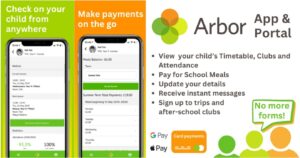
Within the Arbor App (or Parent Portal), you can view:
- Pupil Profile – personal data about your child including your contact details;
- Pupil Calendar – timetable, clubs and trips;
- Attendance including day-to-day attendance and summary-over-time;
- Messages and notices from school;
- School payments.
Within the Arbor App and Parent Portal, you can:
- Update your contact details and your child’s details
- Give consent for trips, clubs etc
- Sign up your child to any of the extra-curricular clubs
- Pay for school meals, trips and other items with Arbor Payments via card payments, Apple Pay or Google Pay.
How to Get Started
Getting started with the Arbor Parent App is quick and easy. Simply follow the step-by-step instructions provided below:
- Download the App: Locate the Arbor Parent App on the Apple App Store or Google Play Store and download it onto your mobile device.
- Login Information: Go to https://login.arbor.sc and click “Forgot your password?” to finish setting up your account.
- Explore the Features: Familiarise yourself with the various features available and make the most of this convenient tool to track your child’s progress and stay updated.
Need More Help?
Click on this link to access the Arbor Help Centre where you can find how to guides and videos on the following topics:
- A quick introduction to Arbor for guardians and parents;
- Logging into the Parent Portal and the Parent App;
- A quick introduction to Arbor for guardians and parents;
- Switch students – Missing children or siblings on the Parent Portal or Parent App;
- Wrong or old school when I try to log into the Parent Portal or Parent App;
- Do I have to put my password in every time to log into Parent Portal or the Parent App?;
- Troubleshooting login issues – why can’t I login to my school’s Parent Portal or Parent App?
For more help with Arbor please see this guide:
A quick introduction to Arbor for guardians and parents – Arbor Help Centre
To make payments please find this guide: